BETAFPV VR02 5.8GHz 40CH FPV Goggles 800x480p
Use discount code
FIRSTLEGENDS at checkout.EXCLUSIVE DISCOUNTS AVAILABLE
Military, First Responders & Students
Learn More
| Minimum quantity | Discount |
|---|---|
| Buy 2 + | Get 10% discount |
FIRSTLEGENDS at checkout.With integrated antennas and battery, the BetaFPV VR02 is an excellent lightweight, streamlined and affordable option for analog FPV!
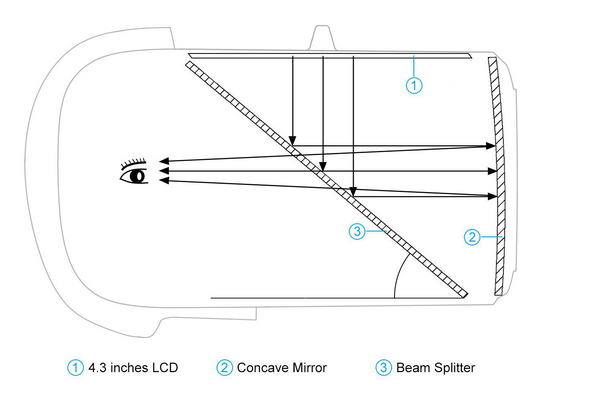
With the built-in antennas and the special design of the Goggles lens, the VR02 Goggles is more compact and exquisite, which makes it maintains a small and lightweight body.


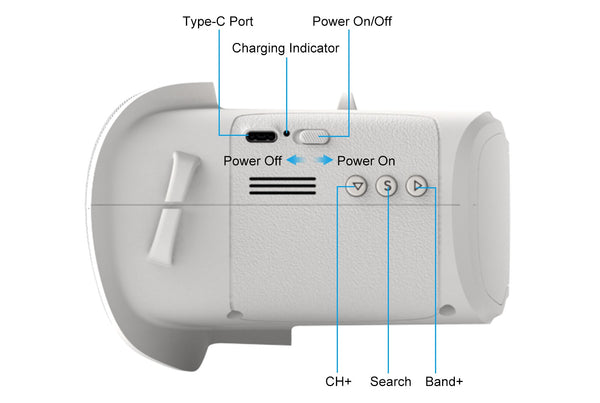
| Button | Instruction |
| Power On/Off |
|
| Band+ |
|
| Search |
|
| CH+ |
|
|
CH
|
CH 1
(MHZ)
|
CH 2
(MHZ)
|
CH 3
(MHZ)
|
CH 4
(MHZ)
|
CH 5
(MHZ)
|
CH 6
(MHZ)
|
CH 7
(MHZ)
|
CH 8
(MHZ)
|
|
GROUP
|
||||||||
|
A
|
5865
|
5845
|
5825
|
5805
|
5785
|
5765
|
5745
|
5725
|
|
B
|
5733
|
5752
|
5771
|
5790
|
5809
|
5828
|
5847
|
5866
|
|
E
|
5705
|
5685
|
5665
|
5645
|
5885
|
5905
|
5925
|
5945
|
|
F
|
5740
|
5760
|
5780
|
5800
|
5820
|
5840
|
5860
|
5880
|
|
R
|
5658
|
5695
|
5732
|
5769
|
5806
|
5843
|
5880
|
5917
|
| L | 5362 | 5399 | 5436 | 5473 | 5510 | 5547 | 5584 | 5621 |
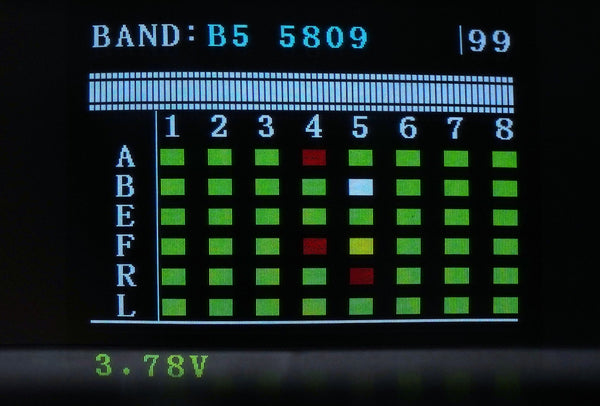
After powering on, short press the "S" button to enter the sweeping interface, as shown below. Pilots can change the Band via the "Band+" and "Ch+" buttons.
Band Status Indicator
| Green | 0<RSSI<20, not occupied |
| Yellow | 20<RSSI<70, there is a drone occupying the Band far away, or there is interference |
| Red | 70<RSSI<99, occupied |
| White | current Band (highest RSSI in the sweep result) |

After powering on, press and hold the "S" button for 1 second to start the frequency auto-search. The frequency auto-search process is 2.5 seconds. After the frequency auto-search is over, it will beep twice and jump to the corresponding Band of the drone.